


How to Set Up Apple CarPlay in Your Toyota Vehicle
With Apple CarPlay integrated into Toyota infotainment systems, your new Toyota has a lot to offer when it comes to connectivity. Before you enjoy those convenient hands-free features, you’ll need to follow a few simple steps. Read on to learn how to set up Apple CarPlay, and contact the Orem Toyota Service Center in Orem if you have any questions!
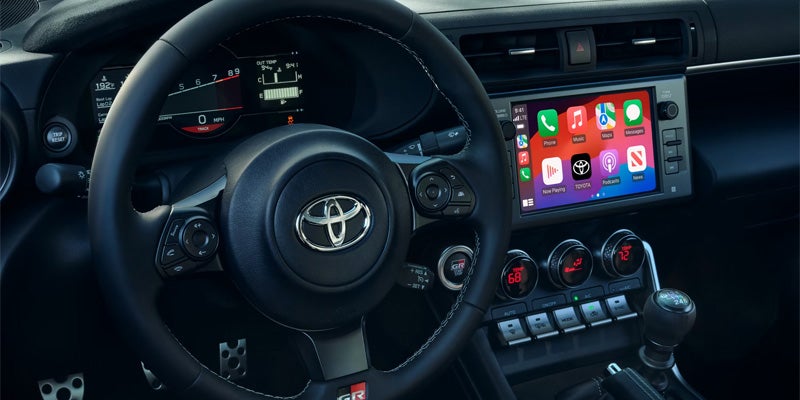
What is Apple CarPlay?
Apple CarPlay is connectivity technology integrated with your Toyota’s infotainment system. Without taking your eyes off the road or your hands off the wheel, CarPlay allows drivers to multitask during all your Provo errands, carpools, and commutes. You’ll engage voice controls to get turn-by-turn directions, make phone calls, listen to music, or send and receive text messages. You can even direct questions to Siri — right from the driver’s seat.
How to Set Up Apple CarPlay
If you’re not one of the tech-savvy among us, we’ve got you covered with the simple steps below:
- Does your Toyota support Apple CarPlay? Most 2019 and newer models do, but an older model may not. Also, be sure you’re in a region where the Apple CarPlay is available.
- Start your vehicle. Siri should come on automatically.
- Connect your iPhone to your Toyota vehicle:
- Your Toyota vehicle will either support CarPlay via a USB cable or with wireless technology. If it’s via USB cable, plug your iPhone into the USB port. The USB port should be labeled with a CarPlay or smartphone icon, but if you can’t find it you can refer to your user manual or speak to a technician at our service center near Lehi.
- If your vehicle supports wireless CarPlay, press and hold the voice-command button found on your steering wheel. The radio should be in either Bluetooth® or wireless mode. On your iPhone, go to Settings > General > CarPlay. Then tap Available Cars, and select your vehicle.
How to Update Apple CarPlay
If you need to update, add or delete anything on Apple CarPlay, follow these simple steps:
- Go to Settings > General, and tap CarPlay.
- Choose your car, truck, or SUV.
- Now you should be able to manage all your icons.
Learn More About Toyota Technology Features at Orem Toyota
For those Draper drivers who’d prefer that a professional technician help set up Apple CarPlay, our team is here to answer all your questions about Toyota technologies, including Toyota Entune. If you’re a driver near Provo, visit Orem Toyota to learn more about technology and convenience features on all-new Toyota vehicles, like the Corolla and Sienna. Don’t miss lots more handy maintenance and car-buying tips from Orem Toyota!
Orem Toyota
1400 Sandhill RDOrem, UT 84058 Driving Directions
| Monday | 9:00AM - 8:00PM |
| Tuesday | 9:00AM - 8:00PM |
| Wednesday | 9:00AM - 8:00PM |
| Thursday | 9:00AM - 8:00PM |
| Friday | 9:00AM - 8:00PM |
| Saturday | 9:00AM - 8:00PM |
| Sunday | Closed |
| Monday | 7:00AM - 6:00PM |
| Tuesday | 7:00AM - 6:00PM |
| Wednesday | 7:00AM - 6:00PM |
| Thursday | 7:00AM - 6:00PM |
| Friday | 7:00AM - 6:00PM |
| Saturday | 8:00AM - 3:00PM |
| Sunday | Closed |
| Monday | 7:00AM - 6:00PM |
| Tuesday | 7:00AM - 6:00PM |
| Wednesday | 7:00AM - 6:00PM |
| Thursday | 7:00AM - 6:00PM |
| Friday | 7:00AM - 6:00PM |
| Saturday | 8:00AM - 3:00PM |
| Sunday | Closed |