

Blog / Features & Specs

Toyota Land Cruiser History: From Start to Finish

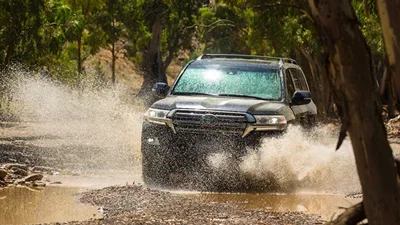
Toyota Land Cruiser

If you’re looking for a rugged vehicle that won’t quit in the Draper area, you might be looking for the Toyota Land Cruiser. This all-terrain vehicle has been a top choice for daring off-road adventurers on the off-roads of Provo, and it has a rich and varied history. With a giant community of vintage Toyota Land Cruiser enthusiasts, it goes without saying that the Toyota Land Cruiser history is a long and interesting tale. Read on and then fill out a pre-approval and contact Brent Brown Toyota to test drive the latest model in Orem!

Toyota Land Cruiser History: Military Use

The origin of the Toyota Land Cruiser has its roots in the Pacific theater in World War II. In 1941, the Japanese army took the Philippines from the Americans. One of the items they salvaged was an American Bantam Jeep, which was quickly shipped back to the authorities in Japan. The Toyota company was chosen to begin work on a vehicle with similar capabilities, but with an appearance that could not be mistaken for an American car. Later, during the war, Toyota produced a light truck called the AK10, although few of them were ever used in battle.

By 1951, the American military had several bases in Japan with which to more effectively fight the Korean War. Toyota began developing a series of military trucks that the Americans could use, rather than having to have trucks shipped all the way from America.

Toyota Land Cruiser History: Civilian Use

By 1955, the Korean War had ended, and military vehicles were no longer in such high demand. The second generation of this vehicle was introduced as the Land Cruiser, a name chosen to compete with the popular Land Rover in England. This generation of trucks was designed to appeal more to civilians looking for a capable small truck and was largely aimed at an export market.

The 1957 Land Cruiser saw the addition of a four-door station wagon, something that certainly never would have been used in wartime. The Land Cruiser was popular in Australia and the very first Japanese car available in the southern continent.

Success in America

The Toyota Land Cruiser steadily grew in popularity in overseas markets, including America. In 1965, the Land Cruiser became the best-selling Toyota in the United States, having passed the 50,000 vehicle mark. Production took off, with the 100,000th Land Cruiser produced in 1968 and the 300,000th by 1973. The Toyota Land Cruiser Association was founded in California in 1976. The Land Cruiser was also sold to the Irish Army, although it was not a success as the wet weather caused the Cruiser to rust.

Today’s Land Cruiser

Now that Lehi drivers are caught up on Land Cruiser history, they’ll be happy to know that the 2021 model is making history. While the current model pays tribute to vintage Toyota Land Cruisers, it implements some sweeping changes. Check out some standard and available highlights from the latest model to see what the Land Cruiser’s legacy means today.

  • Headlight-integrated LED Daytime Running Lights (DRL)
  • Four-zone automatic front and rear climate control
  • Enhanced Multi-Terrain Monitor
  • Birdseye View Camera
  • Premium Audio with Integrated Navigation
  • Rear-seat DVD entertainment system
  • Dynamic Radar Cruise Control (DRCC)
  • Smart Key System on all doors and liftgate with the remote keyless entry system, remote illuminated entry, and Push Button Start
  • 5.7-Liter DOHC 32-Valve V8 with Dual Independent Variable Valve Timing with intelligence (VVT-i); 381 hp @ 5600 rpm; 401 lb.-ft. @ 3600 RPM

Test Drive a Toyota Land Cruiser in Orem

Are you looking for a vintage Toyota Land Cruiser or a new Land Cruiser around Draper? Brent Brown Toyota can help! Call us today at (801) 823-6020 or come see us at 1400 Sandhill Rd. in Orem. We hope you enjoyed our overview of Land Cruiser History. If you’re looking for more fun reads like our Toyota Land Cruiser history guide, explore our Toyota research guides for information about which Toyota models offer AWD, and more!

Posted in:

Related Posts

Toyota Star Safety System™

Contact Us In addition to the Toyota Safety Sense ® (TSS) package and other advanced safety features, new Toyota vehicles for sale near Draper, UT and Salt Lake City, UT also come with the standard Toyota Star Safety System™ to help achieve top safety scores. The Toyota Star Safety System™ includes: Vehicle Stability Control (VCS) – This system works to correct understeer and oversteer for a smoother, safer ride. Traction Control (TRAC) – Responsible for minimizing wheel slippage when accelerating or driving in inclement weather. Anti-Lock Brakes (ABS) – ABS helps prevent the wheels from locking when the brakes are applied. Electronic Brake Distribution (EBD) – EBS uses the technology of ABS to send braking power to the wheels that need it. Brake Assist – When braking, this feature can sense when a driver wants to brake harder and automatically applies more force. Smart Stop Technology (SST) – SST is able to reduce engine power when the accelerator and brakes are pressed at the same time. Learn More With a Test-drive at Brent Brown Toyota Brent Brown Toyota is located near South Jordan, UT in Orem, UT, and you can apply for financing anytime. Got questions for us about the Star Safety System™? Feel free to get in touch!

What is Toyota Safety Connect?

Contact Us If your car is stolen, suffers a flat, or becomes involved in an accident, Toyota Safety Connect can help out with high-tech emergency assistance. The touch of a button connects you with a 24/7 response center that provides: Emergency Assistance Stolen Vehicle Locator Roadside Assistance Automatic Collision Notification Let’s take a closer look at how each Toyota Safety Connect feature can help you in an emergency. Emergency Assistance In the event of an emergency, you can push a button to have emergency services dispatched straight to your location by a response center assistance agent. Stolen Vehicle Locator If your vehicle is being stolen, Toyota response center agents can help find the vehicle with GPS technology once a police report is filed. That’s why vehicles known to be equipped with Toyota Safety Connect are less desirable among thieves. Roadside Assistance When you’re stuck by the side of the road, Safety Connect helps get you moving again as quickly as possible. Press the SOS button to receive help with everything from jump starts to tire changes to emergency fuel deliveries. Automatic Collision Notification Sometimes you’re simply unable to call for help yourself – that’s why Safety Connect has your back with Automatic Collision Notification. When an airbag deploys or a severe rear-end collision is sensed, a response center is notified. One of Toyota’s 24/7 agents will attempt to speak to you, and they can notify local emergency services or request the dispatch of emergency services if necessary. Find Your Toyota Safety Connect Vehicle from Brent Brown Toyota An essential complement to the company’s state of the art driver assistance technologies, Toyota Safety Connect is available across the new Toyota lineup. To find out more or arrange a test drive, don’t hesitate to contact us today.

What is Toyota Bluetooth® Pairing?

Toyota is known for creating innovative technology features that leave the competition in the dust, which is why many Provo drivers will enjoy the Bluetooth® connectivity across the new Toyota model lineup. Bluetooth® in a Toyota Corolla combines your Toyota Entune™ Multimedia System with iPhone® and Android® models to offer: Hands-Free Calling Access Phonebook Music Streaming Brent Brown Toyota has your guide to RAV4 Bluetooth® pairing and the advantages this technology features have to offer. Contact our Draper-area dealership for more information on our Toyota Bluetooth® pairing instructions and more! How to Connect Your Phone to Toyota Bluetooth® Do you need assistance with Toyota RAV4 Bluetooth® troubleshooting? The Brent Brown Toyota service center is here to help! If you have a compatible smartphone and a new Toyota vehicle with Bluetooth®, follow the Toyota Bluetooth® pairing instructions below: Turn On Smartphone Bluetooth®: Go to the settings, select Bluetooth®, and make sure it’s turned on. Activate Bluetooth® on the Toyota Entune™ Multimedia System: Press “SETUP” on the multimedia system faceplate, select Bluetooth®, then select “ADD,” which will add the smartphone. Select Your Toyota on Your Smartphone: Lehi drivers can now choose your vehicle in your smartphone’s Bluetooth® settings. You may need to enter the provided Bluetooth® PIN. Enable Access: Allow Toyota Entune access to messaging and contacts. Are you having errors or not seeing your device on your Toyota Entune system? We’ve listed some common causes for Toyota Bluetooth® troubleshooting below. Toyota Bluetooth® Troubleshooting Sometimes connecting your phone to your Bluetooth® in Toyota Corolla can be tricky, and you may find that after you turn on your Toyota your phone is not shown on your multimedia screen or your phone notifications will not show up on your Toyota Entune screen. If you’re looking for Toyota Bluetooth® troubleshooting, we’ve outlined some causes and solutions below: There are several reasons why your phone would not appear on your Toyota’s multimedia screen. Here’s what to do for each: The vehicle’s Bluetooth® setting may not be enabled. To check this feature go to menu > setup > Bluetooth® > detailed settings > and verify that Bluetooth® power is turned on. Make sure that your phone’s Bluetooth® option is turned on, you can turn on Bluetooth® in your phone’s settings. If there are 5 devices already registered on your Toyota, a new Bluetooth® connection will not be made. Use the same steps above to check which devices are registered on your Toyota, and then remove an old device to pair your new one. If there are two connected devices paired at the same time, one may be selected as audio-only. To fix this, go to the Bluetooth® menu and select “registered devices”. Here you can select which device you’d like to have enabled for phone or music settings by pressing the appropriate icon. If your phone pairs with your Toyota correctly, but your Toyota will not alert you to new messages or phone calls, follow these steps: Check your phone permissions. A lot of Toyota Bluetooth® troubleshooting is caused by the phone itself. Go into your phone’s settings to ensure that push notifications for calls and messages from your preferred app are enabled beside your connected vehicle’s name. If you continue to have problems, you may need to reset your phone or your Entune system: To reset your phone, power off your phone completely for 30 seconds, and turn it back on. Be sure you’re powering off your phone and not just restarting it. To reset the Entune System, press and hold the audio knob to power off the system and Entune will power off and restart on its own. There are many makes and models of phones that are available on the market, and because of this, not every device could be compatible with your Toyota vehicle. If you’re having continued trouble with Toyota Bluetooth® troubleshooting, contact your Brent Brown Toyota Toyota dealer. It could be that your Toyota needs a software upgrade to enable your phone’s connectivity, or it could be a more serious problem. Why Utilize the Toyota RAV4 Bluetooth® Pairing? With Bluetooth® Draper drivers will have total access to the most important functions on their phone while on the roads of Lehi. There are so many benefits to offering this feature, which include: Handsfree Calling: With the press of the voice command button on your steering wheel, you’re free to make hands-free calls so you don’t have to take your eyes off the road or your hands off the wheel. Access Phonebook: Toyota vehicles have a touchscreen display that allows you to go through your contacts and make phone calls. If the address is saved, you are able to navigate there without having to add it manually. Stream Music: If your smartphone has an MP3/WMA player, Lehi drivers can stream their favorite songs through their vehicle’s speakers. Say goodbye to annoying wires, and enjoy listening from either online sources or downloaded music. Visit Brent Brown Toyota For Further Assistance Do you need additional assistance or Toyota Entune™ support? Visit our Provo-area service center where our Toyota-trained mechanics will assist with your Toyota Bluetooth® troubleshooting. Give us a call today with any questions or to schedule a service appointment. We can also help drivers set up Apple CarPlay!